

开发指南
v3.0 升级必读
1、v3.0.0版本中统一使用GCJ-02坐标系
2、以下类名在 v3.0 中发生变化,升级后请全局替换:
1、v3.0.0版本中统一使用GCJ-02坐标系
2、以下类名在 v3.0 中发生变化,升级后请全局替换:
Point → WzPoint | Category → WzCategory
获取KEY
- 创建应用
进入控制台,创建一个新应用。如果您之前已经创建过应用,可直接跳过这个步骤。
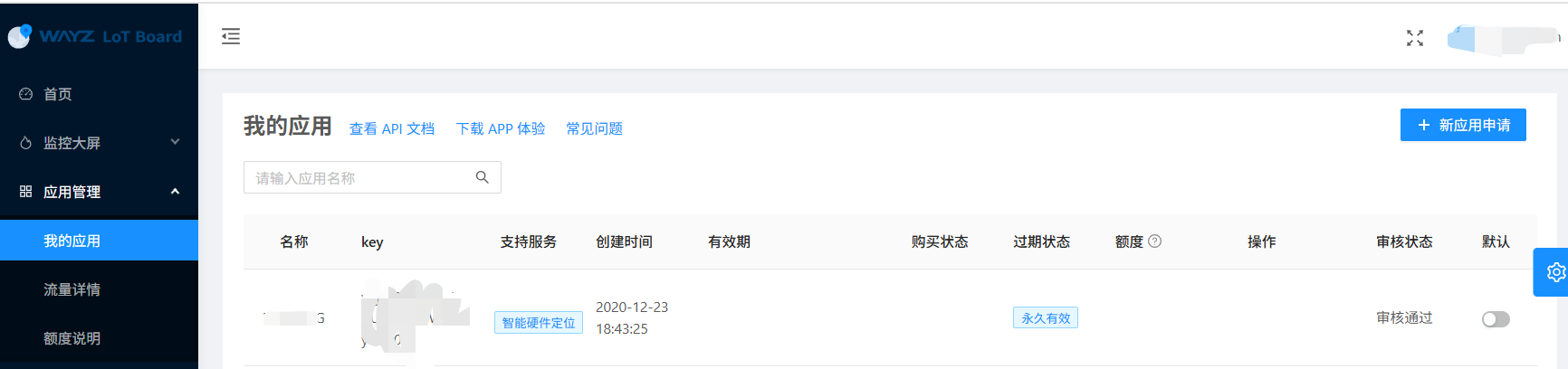
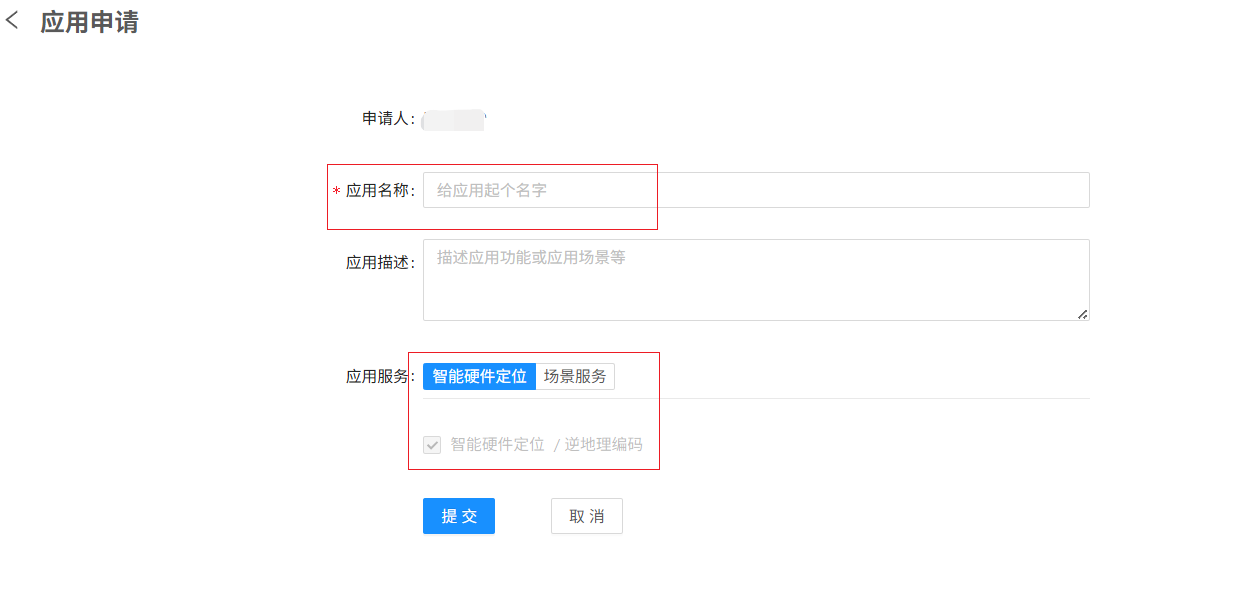
审核通过后,即可获取密钥 accessKey。
项目创建
工程配置
1. 打开/创建一个iOS工程
使用Xcode打开一个iOS工程,或者新建一个iOS工程
2. SDK导入
将解压后的wzLib.xcframework 文件copy或拖拽到工程文件夹中,并在弹框中choose options for adding these files选择add to targets中选择您的工程
3. 权限配置
在项目的 Info.plist 添加定位权限申请:
<key>NSLocationWhenInUseUsageDescription</key>
<string>是否允许使用您的位置?</string>
如App 退到后台仍需要持续获取位置时,需申请始终(Always)定位权限并配置后台定位:
<key>NSLocationAlwaysAndWhenInUseUsageDescription</key>
<string>是否允许后台一直使用您的位置?</string>
<key>UIBackgroundModes</key>
<array>
    <string>location</string>
</array>
4. 代码集成
引入模块并初始化:
import wzLib

let client = WzClientLocation()

// 设置 AccessKey
client.initKey(accesskey: "申请 KEY")

// 单独设置 POI AccessKey
client.setPoiKey(accesskey: "申请 POI KEY")

// 设置代理回调
client.setLocationDelegate(_delegate: self)

// 必须同意隐私政策后才能启动定位
client.setAgreePrivacy(isAgree: true)
注意:启动定位前必须调用
setAgreePrivacy(isAgree: true),否则 startLocation() 和 startFastLocation() 会回调错误。
获取位置信息
坐标系说明
SDK(v3.0.0)所有定位结果、地理编码返回的坐标均为 GCJ-02(火星坐标系)。
SDK(v3.0.0)所有定位结果、地理编码返回的坐标均为 GCJ-02(火星坐标系)。
单次快速定位(推荐)
启动 GPS 后 自动选取精度最优的点回调。一次结果后自动停止。
快速定位优缺点
优点:短时间内择优返回,速度远快于标准单次定位(冷启动可能耗时 10~30 秒)。
缺点:快速定位窗口有限,若 GPS 此时尚未完成首次搜星,精度可能较差
适用场景:App 前台快速获取大致位置(首页定位、打卡签到等),对速度敏感但对精度非极致的场景。
优点:短时间内择优返回,速度远快于标准单次定位(冷启动可能耗时 10~30 秒)。
缺点:快速定位窗口有限,若 GPS 此时尚未完成首次搜星,精度可能较差
适用场景:App 前台快速获取大致位置(首页定位、打卡签到等),对速度敏感但对精度非极致的场景。
client.startFastLocation()

func onReceivedLocation(wzLocation: LocationRes) {
    let lat = wzLocation.location.position.point.latitude   // GCJ-02
    let lon = wzLocation.location.position.point.longitude  // GCJ-02
}
单次定位(标准精度)
精度最高,但冷启动耗时长。
client.isLocateOnce = true
client.startLocation()

func onReceivedLocation(wzLocation: LocationRes) {
    let lat = wzLocation.location.position.point.latitude   // GCJ-02
    let lon = wzLocation.location.position.point.longitude  // GCJ-02
}

func onLocationError(msg: String) {
    print("onLocationError:\(msg)")
}
持续定位
首次定位到达后立即回调,后续按 interval 秒轮询最新位置。
client.isLocateOnce = false
client.interval = 5.0
client.startLocation()

func onReceivedLocation(wzLocation: LocationRes) {
    let lat = wzLocation.location.position.point.latitude   // GCJ-02
    let lon = wzLocation.location.position.point.longitude  // GCJ-02
}

func onLocationError(msg: String) {
    print("onLocationError:\(msg)")
}

// 停止定位
client.stopLocation()
地理编码相关接口
逆地理编码(经纬度 → 地址)
输入的经纬度必须为 GCJ-02 坐标系,不可传入 WGS-84 原始 GPS 坐标,否则返回的地址会有数百米偏差。
// latitude、longitude 必须为 GCJ-02
client.getReverseCode(latitude: 30.505642, longitude: 114.414031)

func onReceivedReverseCode(wzLocation: LocationRes) {
    let address = wzLocation.location.address?.name ?? "无地址信息"
    for ctx in wzLocation.location.address?.context ?? [] {
        print("\(ctx.type): \(ctx.name)")
    }
}
正地理编码(地址 → 经纬度)
client.getGeocCode(address: "武汉市洪山区关山大道43号", city: "武汉市")

func onReceivedGeocode(result: [GeocodeRes]) {
    for item in result {
        print("名称:\(item.name)")
        print("坐标:\(item.geoPoint)")   // GCJ-02
        print("相关度:\(item.relevance)")
        print("完整地址:\(item.address.name)")
    }
}
POI搜索相关接口
POI关键字搜索
client.poiKeySearch(
    name: "泛悦城", city_code: "", city: "武汉市",
    page_index: 1, page_size: 10
)

func onReceivedPoiSearch(result: [GeocodeRes]) {
    for item in result {
        print("名称:\(item.name),距离:\(item.distance)")
    }
}
POI附近搜索
client.poiNearbySearch(
    keywords: "学校",
    location: "114.414031,30.505642",  // "经度,纬度",GCJ-02
    radius: 1000,
    category: "",
    orderby: "distance",
    page_index: 1,
    page_size: 10
)

func onReceivedPoiSearch(result: [GeocodeRes]) {
    for item in result {
        print("名称:\(item.name),距离:\(item.distance)")
    }
}
回调协议参考
| 方法(Swift) | 说明 | 必选 |
|---|---|---|
onReceivedLocation(wzLocation:) | 定位结果,返回 LocationRes | 是 |
onLocationError(msg:) | 定位/请求出错 | 是 |
onReceivedReverseCode(wzLocation:) | 逆地理编码结果,返回 LocationRes | 否 |
onReceivedGeocode(result:) | 正地理编码结果,返回 [GeocodeRes] | 否 |
onReceivedPoiSearch(result:) | POI搜索结果,返回 [GeocodeRes] | 否 |
Swift 完整示例:
import wzLib

class MyController: UIViewController {
    let client = WzClientLocation()

    override func viewDidLoad() {
        super.viewDidLoad()
        client.initKey(accesskey: "申请 KEY")
        client.setLocationDelegate(_delegate: self)
        client.setAgreePrivacy(isAgree: true)
        WzClientLocation.isLogEnabled = true

        // 快速定位
        client.startFastLocation()

        // 单次定位
        client.isLocateOnce = true
        client.startLocation()

        // 持续定位
        client.isLocateOnce = false
        client.interval = 5.0
        client.startLocation()
        client.stopLocation()

        // 逆地理编码(lat/lon 必须为 GCJ-02)
        client.getReverseCode(latitude: 30.505642, longitude: 114.414031)

        // 正地理编码
        client.getGeocCode(address: "武汉市洪山区关山大道43号", city: "武汉市")

        // POI搜索
        client.poiKeySearch(name: "酒店", city_code: "", city: "武汉市", page_index: 1, page_size: 10)
    }
}

extension MyController: LocationDelegate {
    func onReceivedLocation(wzLocation: LocationRes) {
        let lat = wzLocation.location.position.point.latitude   // GCJ-02
        let lon = wzLocation.location.position.point.longitude  // GCJ-02
    }

    func onLocationError(msg: String) {}

    func onReceivedReverseCode(wzLocation: LocationRes) {
        let address = wzLocation.location.address?.name ?? ""
    }

    func onReceivedGeocode(result: [GeocodeRes]) {
        for res in result {
            print("名称: \(res.name), 坐标: \(res.geoPoint)")
        }
    }

    func onReceivedPoiSearch(result: [GeocodeRes]) {
        for res in result {
            print("名称: \(res.name)")
        }
    }
}
Objective-C 兼容性说明
所有类名在 Swift 和 OC 中完全一致,但方法签名会发生变化——Swift 的第一个外部参数名会以 With 形式拼接到 OC 方法名中:
| Swift | Objective-C |
|---|---|
initKey(accesskey:) | initKeyWithAccesskey: |
setAgreePrivacy(isAgree:) | setAgreePrivacyWithIsAgree: |
setLocationDelegate(_delegate:) | setLocationDelegateWith_delegate: |
startFastLocation() | startFastLocation |
startLocation() | startLocation |
stopLocation() | stopLocation |
getReverseCode(latitude:longitude:) | getReverseCodeWithLatitude:longitude: |
getGeocCode(address:city:) | getGeocCodeWithAddress:city: |
poiKeySearch(name:city_code:city:page_index:page_size:) | poiKeySearchWithName:city_code:city:page_index:page_size: |
poiNearbySearch(keywords:location:radius:category:orderby:page_index:page_size:) | poiNearbySearchWithKeywords:location:radius:category:orderby:page_index:page_size: |
代理回调方法:
| Swift | Objective-C |
|---|---|
onReceivedLocation(wzLocation:) | onReceivedLocationWithWzLocation: |
onLocationError(msg:) | onLocationErrorWithMsg: |
onReceivedReverseCode(wzLocation:) | onReceivedReverseCodeWithWzLocation: |
onReceivedGeocode(result:) | onReceivedGeocodeWithResult: |
onReceivedPoiSearch(result:) | onReceivedPoiSearchWithResult: |
Objective-C 完整示例:
@import wzLib;

WzClientLocation *client = [[WzClientLocation alloc] initWithDelegate:self];
[client initKeyWithAccesskey:@"申请 KEY"];
[client setAgreePrivacyWithIsAgree:YES];
WzClientLocation.isLogEnabled = YES;

// 快速定位
[client startFastLocation];

// 单次定位
client.isLocateOnce = YES;
[client startLocation];

// 持续定位
client.isLocateOnce = NO;
client.interval = 5.0;
[client startLocation];
[client stopLocation];

// 逆地理编码(lat/lon 必须为 GCJ-02)
[client getReverseCodeWithLatitude:30.505642 longitude:114.414031];

// 正地理编码
[client getGeocCodeWithAddress:@"武汉市洪山区关山大道43号" city:@"武汉市"];

// POI搜索
[client poiKeySearchWithName:@"酒店" city_code:@"" city:@"武汉市" page_index:1 page_size:10];

#pragma mark - LocationDelegate

- (void)onReceivedLocationWithWzLocation:(LocationRes *)wzLocation {
    double lat = wzLocation.location.position.point.latitude;   // GCJ-02
    double lng = wzLocation.location.position.point.longitude;  // GCJ-02
}

- (void)onLocationErrorWithMsg:(NSString *)msg {}

- (void)onReceivedReverseCodeWithWzLocation:(LocationRes *)wzLocation {
    NSString *address = wzLocation.location.address.name;
}

- (void)onReceivedGeocodeWithResult:(NSArray<GeocodeRes *> *)result {
    for (GeocodeRes *res in result) {
        NSLog(@"名称: %@, 坐标: %@", res.name, res.geoPoint);
    }
}

- (void)onReceivedPoiSearchWithResult:(NSArray<GeocodeRes *> *)result {
    for (GeocodeRes *res in result) {
        NSLog(@"名称: %@", res.name);
    }
}
API 完整参考
WzClientLocation
| 属性 | 类型 | 说明 |
|---|---|---|
accesskey | String? | 访问密钥 |
callDelegate | LocationDelegate? | 定位回调代理 |
interval | Double | 连续定位轮询间隔(秒),默认 1.0 |
isLocateOnce | Bool | true = 单次定位,false = 连续定位,默认 true |
isFastLocation | Bool | true = 快速采样模式(200ms),与 isLocateOnce=true 配合使用 |
isAgree | Bool | 隐私政策同意状态,必须设为 true 才能启动定位 |
| 静态属性 | 类型 | 说明 |
|---|---|---|
isLogEnabled | Bool | SDK 内部日志开关,默认关闭 |
| 方法 | 说明 |
|---|---|
init(delegate:) | 初始化,可选传入代理 |
initKey(accesskey:) | 设置 AccessKey |
setAgreePrivacy(isAgree:) | 设置隐私同意状态(必须先设为 true) |
setLocationDelegate(_delegate:) | 设置或替换代理 |
startFastLocation() | 单次快速定位,200ms 择优回调 |
startLocation() | 启动定位(根据 isLocateOnce 决定单次/连续) |
stopLocation() | 停止定位 |
getReverseCode(latitude:longitude:) | 逆地理编码(GCJ-02 → 地址) |
getGeocCode(address:city:) | 正地理编码(地址 → GCJ-02 坐标) |
poiKeySearch(name:city_code:city:page_index:page_size:) | POI 关键字搜索 |
poiNearbySearch(keywords:location:radius:category:orderby:page_index:page_size:) | POI 附近搜索 |
核心数据模型
LocationRes
├── id: String
├── asset: String
└── location: LocationDetail
    ├── timestamp: Int64
    ├── address: AddressInfo?
    │   ├── name: String
    │   └── context: [Address]
    │       ├── type: String    // Country / Province / City / District
    │       ├── name: String
    │       └── code: String
    ├── place: PlaceInfo?
    │   ├── type: String
    │   ├── name: String
    │   └── distance: DistanceInfo
    │       └── line: Double
    └── position: Position
        └── point: WzPoint
            ├── longitude: Double   // GCJ-02
            └── latitude: Double    // GCJ-02

GeocodeRes
├── id: String
├── geoPoint: String       // "114.412223,30.470140" GCJ-02
├── type: String
├── name: String
├── code: String
├── categories: [WzCategory]?
├── address: AddressInfo
├── relevance: Double
└── distance: Double
v3.0 类名变更:
Point → WzPoint | Category → WzCategory
